
YouTube Thumbnail Size: Dimensions, Ratio and File Limits
· 8 min read
A YouTube thumbnail should be 1280 × 720 pixels, in a 16:9 ratio, saved as a JPG or PNG. YouTube accepts up to 50 MB from a computer and 2 MB from the mobile app, and the image must be at least 640 pixels wide. Larger 16:9 sizes work too.
| Spec | Video thumbnail | Shorts thumbnail | Podcast playlist |
|---|---|---|---|
| Recommended size | 1280 × 720 px | 1080 × 1920 px | Square, e.g. 1280 × 1280 px |
| YouTube's listed resolution | 3840 × 2160 px | 2160 × 3840 px | Not specified |
| Minimum | 640 px wide | 640 px tall | Not specified |
| Aspect ratio | 16:9 | 9:16 | 1:1 |
| Format | JPG or PNG | JPG or PNG | JPG or PNG |
| Max file size, computer | 50 MB | 50 MB | 50 MB |
| Max file size, mobile app | 2 MB | Shorts thumbnails can't be set on mobile | 10 MB |
The resolutions, minimums, ratios, formats and limits come from YouTube's help page for custom thumbnails. The recommended sizes are our own: the most common working size for each ratio. Many guides still list a 2 MB limit and GIF as a format. That was the old spec. The current page lists 50 MB from a computer, and names JPG and PNG.
Why is 1280 × 720 the size most creators use?
1280 × 720 is the largest standard thumbnail file YouTube serves to viewers, so designing bigger rarely shows. YouTube's help page lists 3840 × 2160 as the resolution, and you can upload that. But when we checked the thumbnail files YouTube serves for a popular music video, the largest of its five standard versions was 1280 × 720.
So 1280 × 720 is the practical sweet spot:
- It's large enough to fill YouTube's biggest standard thumbnail file.
- It keeps files small, which matters when you upload from a phone with a 2 MB limit.
- Every design tool has it as a preset.
Work bigger if you want, for example 1920 × 1080 or 3840 × 2160, as long as you keep the 16:9 ratio. Just don't go smaller than 1280 × 720. YouTube's A/B testing downscales every thumbnail in a test to 480p if any of them is under 720p.
What sizes does YouTube actually show your thumbnail at?
YouTube makes several smaller copies of your thumbnail, and most viewers see one of the small ones. These are the five standard files YouTube served for each video we checked:
| File | Size | Ratio | What we noticed |
|---|---|---|---|
| default | 120 × 90 px | 4:3 | Black bars above and below a 16:9 thumbnail |
| mqdefault | 320 × 180 px | 16:9 | The whole thumbnail, no bars |
| hqdefault | 480 × 360 px | 4:3 | Black bars above and below |
| sddefault | 640 × 480 px | 4:3 | Black bars above and below |
| maxresdefault | 1280 × 720 px | 16:9 | Missing for a 2005 video with a low-resolution source |
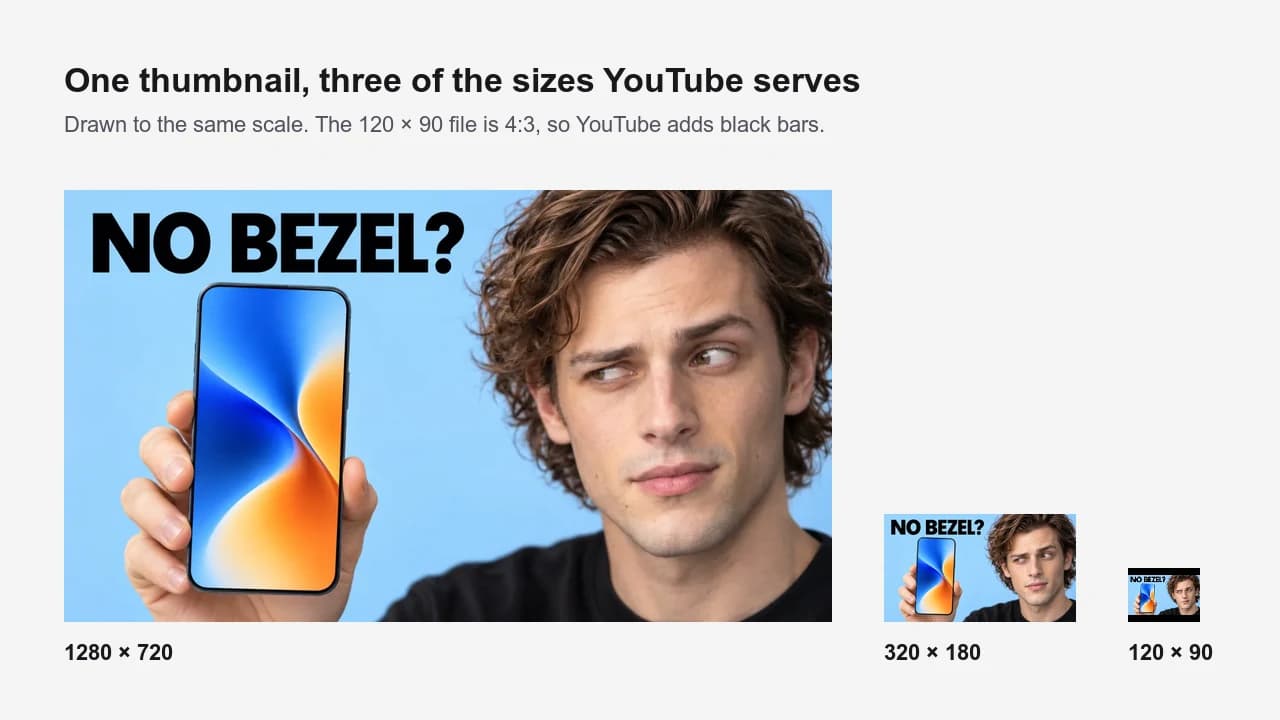 The same thumbnail at three of the sizes YouTube serves, drawn to scale. We resized our own example the way YouTube does.
Two things follow from this.
Design for 320 × 180, not 1280 × 720. At 320 pixels wide, the two-word text in our example is still readable, but a sentence wouldn't be. Shrink your draft to about that size before you export. If the idea doesn't survive, no resolution will save it.
Upload a large source. For "Me at the zoo", the first video on YouTube, the 640 × 480 and 1280 × 720 files don't exist; the request returns a placeholder. Our reading: YouTube only makes the large versions when the source is big enough. Upload at least 1280 × 720 so large screens have a sharp file to use.
What aspect ratio should a YouTube thumbnail be?
Use 16:9 for regular videos. YouTube's help page asks for 16:9 for videos, 9:16 for Shorts and 1:1 for podcast playlists. A video thumbnail in any other ratio has to be cropped or padded to fit a 16:9 card, and you don't get to choose which. So set the canvas ratio before you start, not at export.
Common 16:9 sizes:
| Size | When to use it |
|---|---|
| 1280 × 720 px | The default. Fills YouTube's largest standard thumbnail file. |
| 1920 × 1080 px | If you build from 1080p video frames or want extra room to crop. |
| 3840 × 2160 px | If you build from 4K frames. Watch the 2 MB limit on mobile uploads. |
| 640 × 360 px | YouTube's minimum width. Too small for large screens; avoid it. |
Which file format and file size should you use?
Use JPG for thumbnails built on photos and faces, and PNG when the thumbnail is mostly flat graphics and text. YouTube's help page names those two formats. It allows up to 50 MB from a computer and 2 MB from the mobile app, or 10 MB for podcast thumbnails on mobile.
Don't spend effort squeezing out every kilobyte or keeping a huge lossless file. Viewers never see your upload. They see YouTube's re-encoded copy. For one video we checked, the 1280 × 720 file YouTube served was 65 KB as a JPG and 29 KB as a WebP. A clean JPG export at high quality is all you need.
If you upload from your phone and a PNG is over 2 MB, export it as a high-quality JPG instead of shrinking the dimensions.
What size is a YouTube Shorts thumbnail?
A Shorts thumbnail is 9:16. YouTube's help page lists 2160 × 3840 pixels, with a minimum height of 640 pixels. 1080 × 1920, the usual size of a vertical video frame, works well. Two limits apply: you can only add a custom Shorts thumbnail in YouTube Studio on a computer, and your account has to be verified.
Shorts can't be A/B tested, so the thumbnail you pick is the one everyone sees.
What size is a YouTube podcast thumbnail?
Podcast playlists use a square, 1:1 thumbnail instead of 16:9. YouTube's help page doesn't give a pixel size, so pick a square at least 1280 pixels wide. From a computer the limit is 50 MB. From the mobile app it's 10 MB, higher than the 2 MB for video thumbnails.
Which parts of a thumbnail does YouTube cover?
The bottom-right corner and the bottom edge. YouTube puts the video length in a dark badge in the bottom-right corner. For viewers who have already watched part of the video, it also draws a red progress bar along the bottom edge.
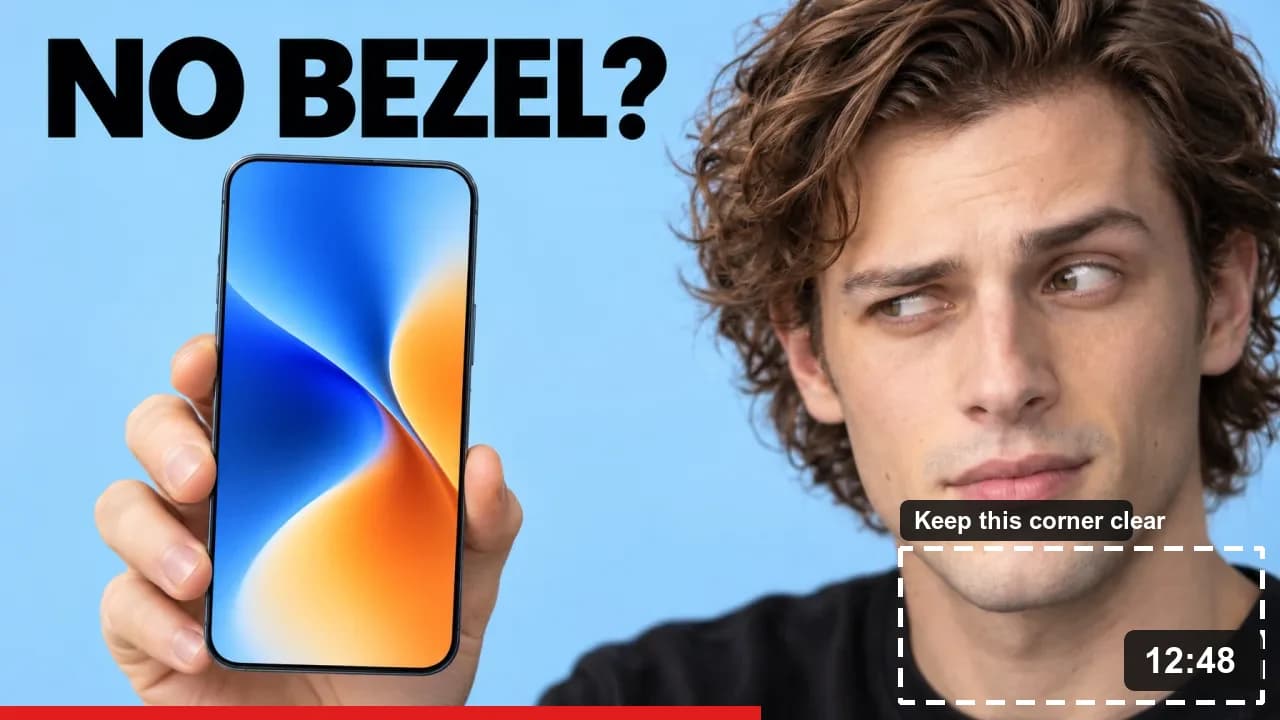 Where YouTube's overlays land. The badge and bar are drawn in to show their approximate position and size.
Keep text, faces and key objects out of roughly the bottom-right fifth of the frame, and don't put anything important along the bottom edge. In our example, the badge covers only the shoulder, which is why that corner is fine to fill with clothing or background.
How do you set up a 1280 × 720 canvas?
Create a new document at 1280 × 720 pixels before you add anything:
- Photoshop: File → New, set width 1280 and height 720 in pixels, RGB color. The ppi setting doesn't matter for screens. Export with File → Export → Export As, as JPG or PNG.
- Canva: search for the YouTube Thumbnail design type, which is already 1280 × 720.
- Any other tool: a custom size of 1280 × 720 px, or any 16:9 size larger than that.
For what goes on the canvas, see how to make a YouTube thumbnail.
How we checked these numbers
On October 25, 2026, we requested the five standard thumbnail files from YouTube's image server (i.ytimg.com) for two public videos: a popular music video with a 4K thumbnail, and "Me at the zoo" from 2005. We measured each file's dimensions and size. The specs come from YouTube's custom thumbnails help page and the A/B testing rule from YouTube's A/B testing help page, both checked on the same day. The example thumbnail was generated with Ctrbuddy, which outputs 16:9 thumbnails, and we resized it ourselves to show how it looks at YouTube's sizes. YouTube can change any of this, so check the help page if Studio shows something different.
Frequently asked questions
Is 1920 × 1080 a good size for a YouTube thumbnail?
Yes. 1920 × 1080 is 16:9, well above the 640-pixel minimum, and YouTube accepts it. It won't look sharper to most viewers than 1280 × 720, because 1280 × 720 is the largest standard thumbnail file YouTube serves. Use it if your frames or design files are already 1080p.
What is the maximum file size for a YouTube thumbnail?
50 MB if you upload from a computer and 2 MB from the mobile app, or 10 MB for podcast thumbnails on mobile. Older guides say 2 MB everywhere; that was the previous limit. A 1280 × 720 JPG is usually well under 1 MB, so the limit rarely matters at that size.
Can I use a GIF or WebP as a YouTube thumbnail?
Stick to JPG or PNG, the two formats YouTube's help page names. Older guides list GIF, but the current page doesn't. The format of your upload doesn't reach viewers anyway: YouTube re-encodes every thumbnail into its own JPG and WebP files before serving it.
What is the minimum size for a YouTube thumbnail?
640 pixels wide for a video thumbnail, which in 16:9 is 640 × 360. For Shorts, the minimum is 640 pixels tall. Treat the minimum as a floor, not a target: under 720p, YouTube's A/B tests downscale your thumbnails to 480p, and large screens have no sharp version to show.
Why does my YouTube thumbnail look blurry?
Usually because the source is small, the export is over-compressed, or the text is too small to survive at 320 pixels wide. Upload at least 1280 × 720 from a computer, export a high-quality JPG, and check the design at small size before blaming YouTube's compression.
Does thumbnail size affect click-through rate?
Not directly. Above 1280 × 720, size makes little visible difference to most viewers. What affects clicks is whether the thumbnail is readable at the small sizes most people see it. To find what works for your audience, A/B test your thumbnails in YouTube Studio.